










Unlocking the Power of Autonomous Database on OCI

The Autonomous Database on Oracle Cloud Infrastructure (OCI) is revolutionising how businesses manage their data, offering unprecedented automation, scalability, and security.

Oracle Autonomous Database is a cloud-based service that automates tasks like provisioning, configuring, tuning, and scaling using advanced machine learning. It minimizes human intervention, reduces errors, lowers operational costs, and boosts performance, allowing organizations to focus on strategic goals. With built-in AI and support for LLMs, it accelerates app innovation, enabling natural language queries, contextual conversations, and retrieval-augmented generation (RAG) through its vector store. Integrated AI and in-database ML enhance applications with text, image, and speech analysis, along with personalized recommendations.

Key Features of Oracle Autonomous Database

  • Self-Driving Capabilities: One of the significant features of the Autonomous Database is its self-driving capabilities. It automatically provisions resources, tunes performance, and applies security patches, ensuring optimal database performance without manual intervention.
  • Self-Securing: Security is paramount today. The Autonomous Database automatically protects against unauthorised access and cyber threats by applying security updates and patches in real-time. This reduces the risk of vulnerabilities and enhances data integrity.
  • Self-Repairing: The Autonomous Database minimises downtime through its self-repairing capabilities. It automatically detects and resolves issues, ensuring high availability and reliability.
  • Scalability: With OCI’s flexible infrastructure, the Autonomous Database can easily scale resources up or down based on demand. This elasticity allows organisations to efficiently manage workloads without over-provisioning or underutilising resources.
  • Support for Multiple Workloads: The Autonomous Database supports both transactional (OLTP) and analytical (OLAP) workloads, making it suitable for a wide range of applications, from online transaction processing to data warehousing, as well as JSON workloads, through specialized configurations like Autonomous Transaction Processing (ATP) for transactions and Autonomous Data Warehouse (ADW) for analytics.
  • Integration with Machine Learning: By integrating machine learning capabilities, the Autonomous Database enables organisations to perform advanced analytics and predictive modelling directly within the database. This empowers businesses to derive deeper insights from their data.

Benefits of Oracle Autonomous Database

  • Cost Efficiency: Automating routine database management tasks reduces the need for extensive IT resources, leading to significant cost savings. Organisations can allocate their budget strategically, investing in innovation rather than maintenance.
  • Improved Performance: The self-tuning capabilities of the Autonomous Database ensure that performance is optimised continuously. This leads to faster query response times and improves overall application performance.
  • Enhanced Security: With automatic updates and real-time threat detection, organisations can rest assured that their data is secure. This built-in security reduces the risk of breaches and compliance violations.
  • Faster Time to Market: By eliminating the complexities of database management, organisations can focus on developing and deploying applications more quickly. This agility allows businesses to respond to market changes and customer needs more effectively.
  • Seamless Integration with OCI: The Autonomous Database is designed to work seamlessly within the OCI ecosystem. Organizations can easily integrate it with other Oracle services, such as Oracle Analytics Cloud and Oracle Data Science, to create comprehensive data solutions.

Use Cases for Oracle Autonomous Database

  • Data Warehousing: Organisations can leverage the Autonomous Database for data warehousing, enabling them to store and analyse large volumes of data. Its ability to handle complex queries and analytics makes it ideal for business intelligence applications.
  • Application Development: Developers can utilise the Autonomous Database as a backend for applications, benefiting from its scalability and performance. This allows for rapid development and deployment of applications that require robust data management.
  • Financial Services: In the financial sector, the Autonomous Database can streamline operations by automating compliance reporting, transaction processing, and risk management. Its security features also help mitigate fraud and data breaches.
  • Healthcare: Healthcare organisations can use the Autonomous Database to manage patient data, improve research outcomes, and enhance operational efficiency. The database’s self-securing capabilities ensure compliance with regulations like HIPAA.
  • E-commerce: E-commerce businesses can benefit from the Autonomous Database’s ability to handle fluctuating workloads during peak shopping seasons. Its performance and scalability ensure that online platforms can provide a seamless customer experience.
  • Transactional Workloads: Supports online transaction processing (OLTP) with high scalability and low latency, enabling real-time fraud detection through advanced machine learning algorithms for enhanced security and seamless user experiences.
  • JSON-Based Applications: Enable native storage, querying, and analysis of JSON data, offering NoSQL-like features to support modern app development with enhanced flexibility, scalability, and efficient data handling.
  • Backup and Disaster Recovery: Ensure automated backups and replication for high availability, coupled with robust disaster recovery strategies to minimize downtime and maintain business continuity.

Conclusion

Eliminate database complexities with Yotta’s comprehensive Oracle Solutions and Managed Services. Our expert team ensures end-to-end management, security, seamless implementation, and high availability for your business-critical databases. Whether you are migrating from an on-premises data center to the cloud, or moving data between different cloud environments, Yotta’s Oracle Migration Services guarantee a smooth transition with zero disruption to your business operations.

With specialised services like cloud migration, platform migration, and continuous updates, we make sure your database is always optimised for performance and security. Yotta’s provide Oracle services in a Tier-4 Fault-Tolerant Data Center (DC-NM1), for maximum uptime and reliability or your Location. Additionally, we offer consulting and resource augmentation to support your team at every stage of the migration process.

By automating routine tasks and providing advanced analytics capabilities, the Autonomous Database enables businesses to focus on innovation and strategic growth. As organisations continue to navigate the complexities of data management, embracing solutions like the Oracle Autonomous Database will be crucial in staying competitive in an increasingly data-driven landscape.

A Comprehensive Guide to Oracle Database Migration: Advisory, Planning, Execution, and Support 

Migrating an Oracle Database is a significant process for organisations aiming to modernize infrastructure, improve performance, or transition to the cloud. Whether you’re upgrading versions or switching platforms, a structured approach is crucial for success. Successful migrations are not only about moving data but also about ensuring continuity, scalability, and optimal performance post-migration. A comprehensive approach enables organisations to take advantage of new functionalities while minimising disruptions to ongoing operations.  

This guide outlines the key phases of Oracle Database migration: Advisory, Planning, Execution, and Support, highlighting important considerations throughout the process. 

  1. Advisory Phase

This phase establishes the foundation for your migration project by assessing the current environment and understanding business requirements. 

  • Current Environment Assessment:  Evaluate the hardware, software, and network configurations of your existing database to understand its current state. This analysis provides a baseline for migration planning and identifies any infrastructure upgrades needed. 
  • Business Requirements:  Define your migration goals, whether they involve cost reduction, performance improvements, or enhanced security features. Clearly outlining these objectives will guide decision-making and ensure alignment with overall business priorities. 
  • Feasibility Study:  Consider the different migration options, such as moving to the cloud or maintaining an on-premises setup, while evaluating each for technical and financial feasibility. Factor in acceptable downtime and budget constraints to select the most practical migration approach for your organisation. 
  1. Planning Phase

In this phase, a detailed roadmap for migration is created to minimize risks and ensure smooth execution. 

  • Migration Strategy:  Develop a strategy that best fits your needs, such as a full database migration or a phased approach to minimize downtime. This tailored strategy will help streamline execution and align resources efficiently throughout the process. 
  • Data Mapping & Transformation:  Plan how data will be transferred, including any transformations or cleansing needed to ensure compatibility with the new environment. This step helps prevent data integrity issues and enables a smooth transition to the target system. 
  • Timeline & Resource Planning:  Set milestones to track progress, and assign team roles to clarify responsibilities. Clear timelines and role definitions keep the project organised and prevent resource bottlenecks. 
  • Risk Management:  Identify potential risks, from data loss to compatibility issues, and establish mitigation strategies, including backup and fallback plans. Proactive risk management minimizes unexpected disruptions and provides a safety net during migration. 
  1. Execution Phase

This is where the actual migration happens, requiring careful coordination and testing. 

  • Pre-Migration Testing:  Conduct comprehensive tests in a staging environment that mirrors the production setup, checking for data integrity and performance issues. This testing phase helps identify potential errors and prepares the team for a successful migration. 
  • Data Migration:  Execute the actual data transfer, using methods such as replication, Oracle Data Pump, or other tools suited to the project’s needs. Ensuring data is transferred accurately and securely is critical to maintaining operational continuity. 
  • Cross-Platform Migration:  Address any platform-specific challenges that arise, such as endian conversion or compatibility adjustments between different operating systems. Managing these technical nuances is essential for ensuring a seamless experience on the target platform. 
  • Post-Migration Testing: Perform extensive validation testing to confirm the success of the migration, checking for data accuracy, system performance, and application compatibility. This step verifies that the new environment meets all operational requirements before going live.  
  1. Support Phase

Post-migration support is vital to maintain database stability and optimize performance. 

  • Monitoring: Use tools like Oracle Enterprise Manager to continuously monitor database performance and system health.  
  • User Training:  Effective training programs can boost adoption rates and help users transition smoothly, reducing the volume of post-migration support tickets.. 
  • Ongoing Support:  Robust ongoing support includes technical assistance to resolve issues promptly, regular performance tuning to maintain optimal efficiency, and scheduled updates to apply security patches and new features. 
  1. Special Considerations for Cross-Platform and Cloud Migrations
  • Platform Compatibility:  Verify that the target platform can support all features of the source platform, including hardware configurations, software dependencies, and specific database functionalities. This step minimises functionality gaps and reduces post-migration adjustments. 
  • Cloud Migrations:  Account for critical cloud-specific factors such as network latency, data security, and regulatory compliance to maintain performance and meet legal standards. Consider data residency requirements and cloud provider certifications to ensure the environment aligns with your organisation’s security policies. 
  • Upgrading to the Latest Version:  Use tools like Oracle’s Database Upgrade Assistant (DBUA) to streamline the upgrade process when migrating to newer Oracle Database versions. These tools help automate compatibility checks and optimise performance on the upgraded system, reducing the risk of manual errors. 

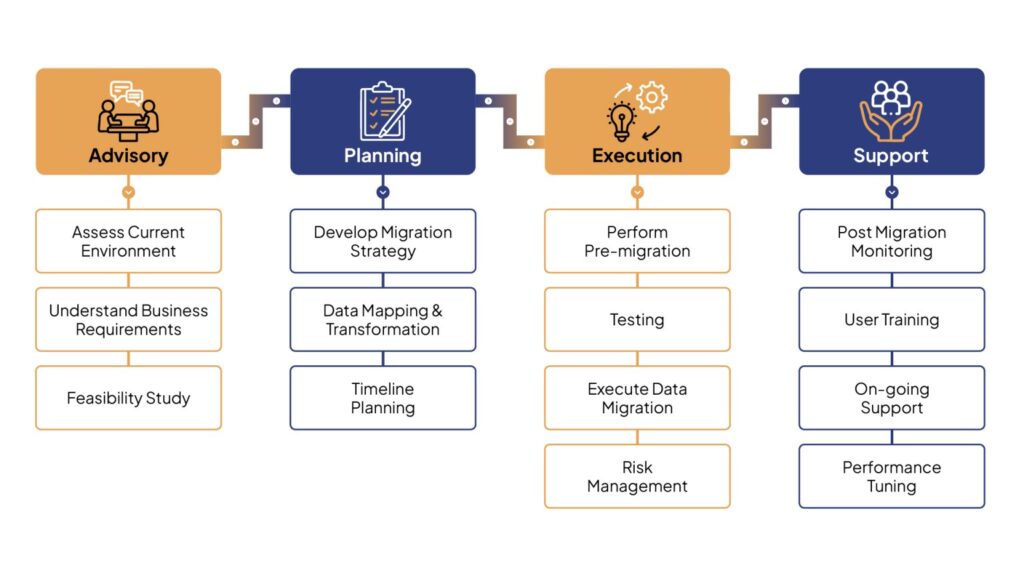
The following diagram illustrates the phases involved in Oracle Database migration: 

comprehensive guide to oracle database migration 1536x864 1
  1. Additional Tips for a Successful Migration
  • Communication: Keep stakeholders informed throughout the migration process. 
  • Backup and Recovery: Ensure robust backup and recovery plans. 
  • Performance Tuning: Focus on database optimization post-migration. 

Conclusion 

By following this structured approach, organizations can navigate Oracle Database migrations with confidence. Yotta’s Oracle Solutions & Managed Services offer expertise across each phase, ensuring a smooth transition to the cloud, platform switch, or version upgrade.  To make your Oracle Database migration seamless, Yotta’s Oracle Services provide end-to-end support, from advisory to execution and ongoing management. 

Oracle KVM vs. VMware: In-Depth Feature Analysis and Market Growth Insights

Virtualisation is a cornerstone of modern IT infrastructure, enabling businesses to optimise resources, scale efficiently, and reduce costs. Although VMware is a major player in this space, Oracle KVM is fast catching up. This blog post compares their features, costs, market growth, and prospects, and explores why Oracle KVM may be particularly advantageous for Oracle database customers.

Feature Comparison

FeatureOracle KVMVMware
Hypervisor TypeXen-basedESXi (bare-metal)
Management ToolsOracle Linux Virtualization ManagervCenter Server
Supported Guest OSBroad range including Oracle Linux, Windows, SolarisWide range including Linux, Windows, Solaris
IntegrationTight integration with Oracle services and productsExtensive third-party integrations
High AvailabilityYesYes
Live MigrationYesYes (vMotion)
Storage ManagementOracle VM Storage ConnectvSAN, VMFS, NFS
NetworkingOracle VM Virtual NetworkingNSX
Hard PartitioningYesNo
Backup and RecoveryOracle Recovery Manager (RMAN)vSphere Data Protection, third-party tools
LicensingIncluded with Oracle productsSeparate licensing

Cost Comparison

AspectOracle KVMVMware
License CostIncluded with Oracle productsVaries; Higher costs, especially for vSphere Enterprise Plus
Support CostGenerally Lower, included with Oracle support contractsHigher Support costs, depending on service level
Initial Cost SetupLower, due to inclusion with OracleHigher, due to separate licensing
Total Cost of Ownership (TCO)Lower for Oracle-Heavy environmentsHigher especially with additional features

Growth Trajectory and Market Dynamics

Oracle KVM:

  • Market Growth: Oracle KVM has experienced steady growth, particularly in enterprises heavily utilising Oracle databases and applications. Its seamless integration with Oracle products makes it a compelling choice for such environments.
  • Future Prospects: The future of Oracle KVM is promising, with ongoing enhancements to support the new Oracle database and application features, aligning with Oracle’s cloud strategy.

VMware:

  • Market Growth: VMware remains a dominant player in the virtualisation market, known for its extensive feature set and robust ecosystem. It is preferred for large-scale and heterogeneous environments.
  • Future Prospects: VMware’s future is strong, driven by innovation in hybrid cloud, edge computing, and Kubernetes integration (via Tanzu).
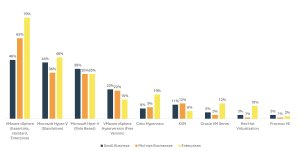
Oracle-KVM-vs-VMware-Feature-Comparison-chart

[Src: Spiceworks survey]

Why Choose Oracle KVM?

  • Tight Integration with Oracle Products: Oracle KVM provides optimised performance and easier management for Oracle-heavy environments due to its seamless integration with Oracle databases and applications.
  • Cost Efficiency: Inclusion with Oracle products mean lower licensing and support costs, resulting in a reduced total cost of ownership (TCO) for organizations invested in Oracle solutions.
  • Hard Partitioning: Oracle KVM supports hard partitioning, essential for Oracle database customers to comply with licensing policies. This feature allows precise allocation of CPU resources, potentially reducing licensing costs and improving performance.
  • Simplified Management: Oracle KVM Manager offers an intuitive interface for managing virtual environments, simplifying administrative tasks and reducing operational overhead.
  • Robust Security and Compliance: Oracle KVM aligns with Oracle’s security standards, ensuring enterprise data remains secure and compliant with industry regulations.

Hard Partitioning: A Key Benefit for Oracle Database Customers

Hard partitioning in Oracle KVM enables administrators to allocate specific CPU cores to virtual machines, which is beneficial for Oracle database customers because it:

  • Optimises Licensing Costs: Limits the number of CPU cores allocated to Oracle databases, helping to manage and potentially reduce licensing costs.
  • Improves Performance: Dedicated resources ensure consistent performance for critical Oracle database workloads, reducing the risk of resource contention.
  • Enhances Compliance: Helps organisations comply with Oracle’s licensing policies, avoiding potential legal and financial issues.

Conclusion

Both Oracle KVM and VMware offer robust virtualisation solutions, each with distinct advantages. Oracle KVM is particularly suited for enterprises reliant on Oracle databases and applications, providing cost efficiency, tight integration, and the benefit of hard partitioning. VMware remains a versatile choice for diverse and large-scale environments, with a comprehensive feature set and a strong market presence. Organisations should consider their specific needs, existing investments, and future growth plans when choosing between Oracle KVM and VMware. For Oracle-centric environments, Oracle KVM offers compelling benefits that align well with Oracle’s broader ecosystem and strategic direction.

Yotta’s suite of Oracle solutions empowers businesses to streamline operations and achieve transformative outcomes by eliminating complexities. With all Oracle services— from software and licenses to infrastructure—delivered under one roof, Yotta simplifies deployment and management, backed by dedicated technical support and robust infrastructure. The flexible, pay-as-you-go model ensures transparent pricing, while Yotta’s Oracle Service Portfolio covers everything from consulting and migration to database implementation and managed services, maximizing success across business functions.